📚 BOOK → Harness Engineering (I. Wijesiri, 2026)
Rating: 8/10 | Beginner to Intermediate AI Engineers | Today's word: Ghost · Geist · ゴースト · רוח רפאים
🎧 "Whether you believe you can, or you believe you can't, you're right." — Henry Ford (and Grandma Helga's favorite quote)

Today, we'll take a look at a fresh (and delightfully opinionated) open-source book on harness engineering by Isuru Wijesiri. This is a valuable exercise for everyone just getting started, as well as for people like me, who simply love the craft and never shy away from a good resource — whether it's 101-level material or something at the postdoctoral level.
For anyone new here, harness engineering is directly relevant to the work we're doing on NULLSTAR's PleiadesOS:MAIA and PleiadesOS:TAYGETE modules.
As I read through the material, below are my highlights — with a moderate attempt at coherence — for my personal inventory (and perhaps as a way to connect with other friendly AI scientists and builders out there who love talking about the same things). As always, please remember our rules:
🤖 If you see a 👾, it means I found something particularly cool or learned something new.
🤖 If these notes look cool to you, it's your ✦moral duty✦ to read the original resources.
🤖 Just another blog, but not your usual blog: they're living notes that I change as I fancy.
👻 Part I — The Wire
It's just a JSON Array
👾 An LLM API is stateless. Every turn, you send the entire conversation as a JSON array and get text back. A harness is the program that builds, maintains, and protects that array. Everything the field calls "agents" is a set of patches to that one loop, and each patch exists because something concrete broke.
The API is stateless. The server remembers nothing between calls. Sessions are just files:
- “Conversation memory” is your program keeping a list.
- “The model forgot something” means the thing fell out of the array.
- “Context management” means deciding what goes in the array.
- “The context window” is the maximum size of the array.
- Cost scales with the array, and you resend it every turn.
So a harness is “a program that maintains a JSON array”:
- What enters the array: user text, file contents, tool results, injected instructions.
- What leaves the array: compaction, summarization, forgetting.
- What the array’s structure must preserve: ordering and byte stability.
- Which of the brain’s requests to actually execute: permissions, guardrails, sandboxes.
- When to interrupt the brain, and when to wake it.
The Brain: A Next-Token Black Box
Here is the whole model in one sentence: you give an LLM a sequence of tokens, and it gives back a probability for every possible next token.
Here are the three terms that matter most:
- Token: a chunk of text, usually 3 to 4 characters of English. “harness engineering” is about 4 tokens. Everything is measured in tokens: context windows, prices, speed.
- Temperature: how randomly the serving layer picks from the probabilities. Temperature 0 means always pick the most likely token. Higher values mean more variety. For agents you usually want low temperature, because you want the probable action, not the creative one.
- Context window: the maximum number of tokens the model can take as input. This is the hard size limit on the array.
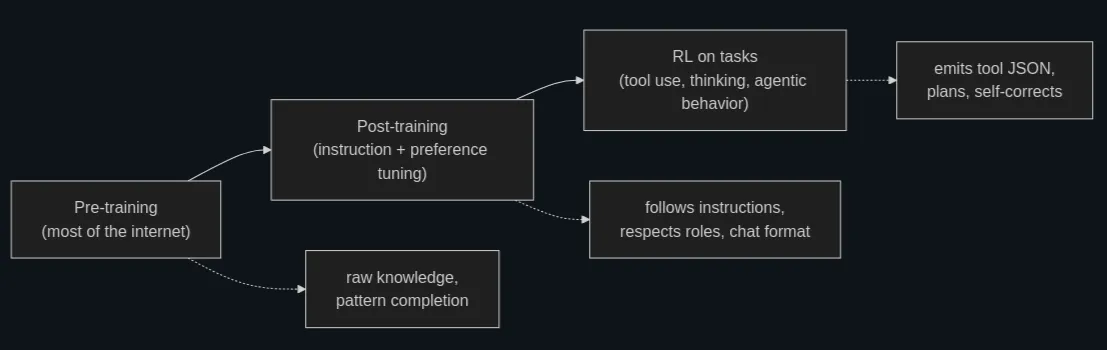
Modalities:
- When a model “reads a PDF,” the harness or the provider’s API layer usually pulls out the text and turns each page into an image, then puts both into the array as ordinary text and image blocks. The brain never sees a PDF, only tokens that used to be one.
- A thing marketed as a model capability turned out to be mostly body work. Preprocessing, extraction, and rendering happen in the harness or in the provider’s serving stack, before the brain runs. The same is true of audio in many products (a transcription model runs first) and of “reading spreadsheets” (the harness converts to CSV or renders a screenshot).
Everything above compresses into rules you will use in every later chapter:
- The model is a pure function. Given the same array in, you get the same probability distribution out. All state lives on your side.
- Trust retrieval over recall. Model weights hallucinate, while tool results do not. Feed the brain ground truth instead of asking it to remember.
- Roles work because of training, not enforcement. The system prompt is strong guidance, not an access-control system.
- Tool calling and thinking are trained skills. You get them by asking in the format the model was trained on, which the provider documents.
- Everything is tokens in one sequence. Images, thinking and tool calls are all blocks, and every one is counted and paid for.
- Errors are useful input. The model was trained to react to failure, so pass error messages back into the array.
Tools: JSON Mapped to Functions
The failure: the brain can only emit text. The patch: let the model emit a structured request, and have your program execute it.
The user is a tool too: That is human-in-the-loop at its simplest.
- A tool is three pieces of JSON: a schema in the request, a
tool_useblock in the reply, and atool_resultblock in the next message.
The Agent Loop
The patch: keep the conversation going automatically, in a loop.
An agent is a while loop around a chat completion: call the model, run the requested tools, append the results, and repeat until
end_turn.
Where the industry’s vocabulary gets grand: “agentic AI,” “autonomous systems,” “orchestration.” Here is what the words mean in code:
while True:
    reply = call_llm(messages)
    messages.append(assistant_message(reply))
    if reply["stop_reason"] != "tool_use":
        break
    results = [execute_tool(b) for b in tool_calls(reply)]
    messages.append(tool_results_message(results))
- When an agent performs badly, beginners add orchestration: hardcoded step sequences, planner modules, state machines around the model. Usually the better fix is in the array: clearer tool descriptions, better error messages, the right context. The loop rarely needs to be smarter, but the messages do need to be better.
- Each API response carries a stop_reason telling you why the model stopped generating. At the core there are two states:
tool_usemeans the turn is still in progress;end_turnmeans the brain considers the task done. A “turn” in an agent is one user request plus however many model+tool rounds the loop runs beforeend_turn, not one API call. Errors includemax_tokens, andrefusal/safety.
- The loop works, so now look at what it costs. Forty rounds each resend the entire growing array. If the array is 50,000 tokens by mid-task, forty rounds will send roughly two million input tokens for a single user request. Prompt caching fixes that cost, and it is why the order of your array affects your API bill.
ReAct: the loop’s ancestor (from a 2022 paper, “Reasoning + Acting”)
- Before models were trained for tool use, we got agent behavior by prompt formatting. You instructed the model to answer in a rigid pattern:
Thought: I should check what files exist here.
Action: run_command["ls"]
Observation: main.py  test_main.py
Thought: Now I should read main.py.
Action:...
- The harness parsed the Action: line with string matching, executed it, appended a fake Observation: line, and called the model again. It was the same loop as ours, but with the tool protocol built from prose and hope. It broke whenever the model varied the wording, which was often.
- ReAct matters for two reasons. First, historically, its “reason, act, observe” cycle is what got baked into models during the RL training. Native tool calling is ReAct moved from the prompt into the weights, keeping the cycle while dropping the string parsing. Second, in practice, when you see a framework or tutorial teaching ReAct-style prompting today, you are looking at a technique for models that lack tool training, or at a tutorial older than it looks. With a modern model you get the Thought (as thinking blocks), the Action (as tool_use blocks), and the loop, natively.
Caching: Why Order Matters
The patch: the provider caches the part of your array it has already processed, and charges you a tenth of the price for it. But the cache only works if your harness keeps the array byte-stable.
- When a model reads your array, it processes tokens front to back, building up internal state as it goes. That state is expensive to compute. Prompt caching means the provider stores it, keyed on the exact bytes processed so far. On your next request, it compares your new array against the stored one, front to back, finds the longest matching prefix, and skips recomputing it.
- The one rule: never edit the top: appending is cheap. Editing anything above the append point costs you everything below it.
Classic accidental cache-busters:
➡️ A timestamp in the system prompt. Current time: 14:44:01 at the top of the array means no request ever hits the cache. If the model needs the date, put it somewhere stable (the date, not the second), or inject it low in the array.
➡️ Reordering tools. Tool schemas are part of the prefix. If you build the tool list from an unordered dict, so it serializes in a different order per process, the cache is gone. Sort your tools.
➡️ Changing the tool list between turns. Users can turn MCP servers on and off, and every toggle edited the tool array, so the next request missed the cache. Fetching MCP tools fresh before every request can do the same, because any change in what the servers return changes the prefix.
➡️ “Improving” the system prompt mid-session. Any conditional text up top rewrites byte one.
➡️ Rotating content in place, like keeping a live “current status” section near the top of the array and updating it each round.
➡️ Removing old messages from the middle to save space. This one hurts the most. Trimming the array to make it smaller can actually make it more expensive, because the trim invalidates the prefix.
Cache breakpoints
- OpenAI caches automatically. Send a request whose prefix matches a recent one and the discount appears. There is nothing to configure. Anthropic makes it explicit. You mark up to four cache breakpoints in the array with
cache_controlmarkers. - Watch
cache_read_input_tokens. A low cache-hit rate is an expensive bug.
👻 Part II – Running Long
Context Is a Budget, Not a Bag
A long debugging session reads dozens of files, runs dozens of commands, and every byte of that lands in the array and stays there. At some point the array hits the model’s input limit, the next API call is rejected, and the task dies mid-flight. The hard limit is only the obvious part of the failure, because models get worse before they get full. Long before the window limit, an overfull array weakens the model’s attention (context rot).
Two basic moves: forgetting well (compaction) and remembering outside the array (memory files).
- Every API response reports input token counts, and your harness should track them per round and know what the array is made of.
- Truncate tool output at the source. No model needs 80,000 tokens of
npm installoutput. Cut the result, write the full output to a file, and give the model the file path with a reminder not to read the whole thing at once.
- Read ranges, not files. Give your
read_filetooloffsetandlimitparameters and mention them in the description.
- Don’t inject what the model can fetch.
Compaction
The harness notices the array approaching a threshold (say 80% of the window) → Replace the older part of the conversation with a summary of itself and continue with the space reclaimed.
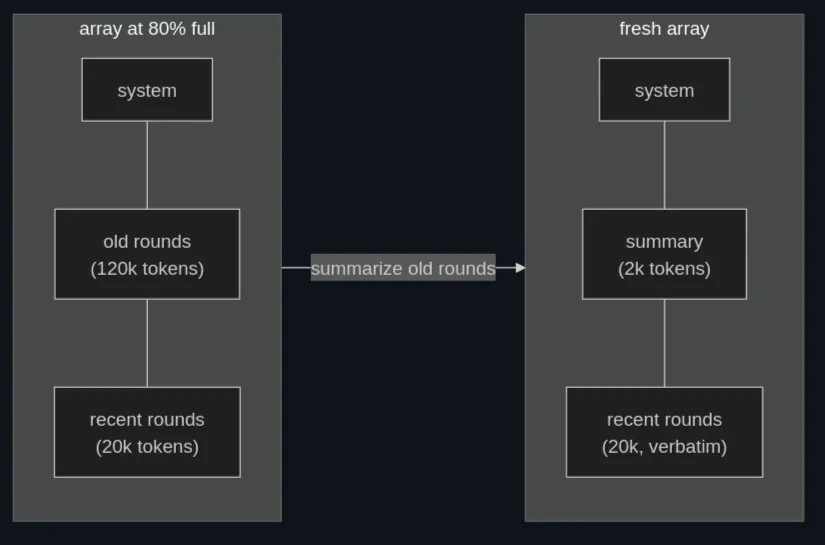
- Compaction is lossy, and the loss is not random.
- Compaction is a cache reset, and that is fine, because it is rare.
Memory Files
A memory file is a plain text file the harness injects into the array at session start. [MY EDIT: at NULLSTAR, memory is a much more complex and smarter system, covered by the module PleiadesOS:ELECTRA].
- Inject memory as a user-side message, not into the system prompt.
- Memory is a budget line too. Production harnesses warn when memory files get fat.
Subagents: Fork the Context
A subagent is a second agent loop, run with a fresh, empty array, given one task, whose final answer is returned to the main loop as a tool result. Then its array is thrown away. So a subagent is a loop (or a context tool), called as a function.
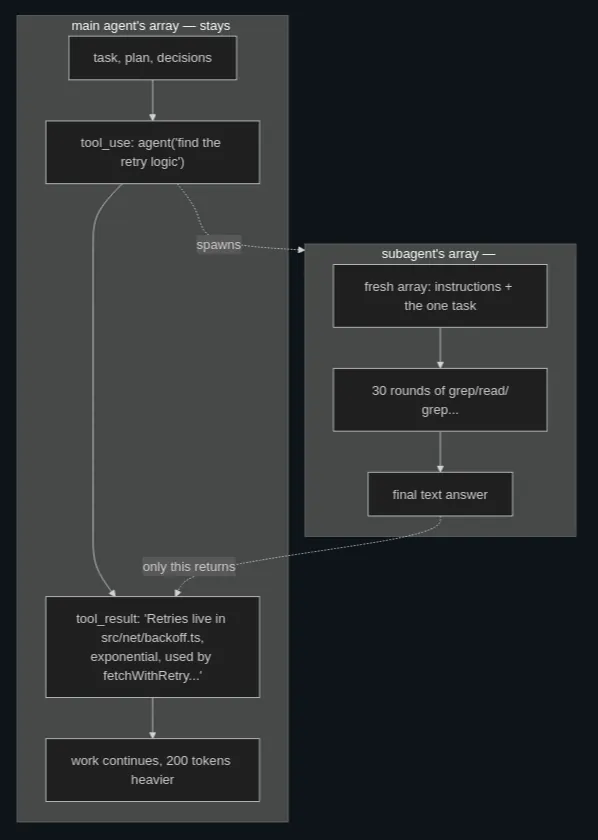
- Subagents exist to protect the main agent’s context.
- The child knows nothing. Its array starts empty except for its instructions and the task string the parent wrote. It has not seen the conversation, the user, or the plan. So the parent’s task description must be self-contained: what to find, where to look, what shape of answer to return.
- Results return on the tool channel. To the parent, agent is just another tool that sends a request out and gets a result back.
- Production harnesses define profiles (an explorer that cannot write files, a planner, a reviewer): different system prompts and different tool subsets per type.
- Different brains per role. Routine search does not need the frontier model; a cheaper model does it fine.
- Background execution. The parent should not block for minutes on a slow child.
- A fork variant. One special child type starts with a copy of the parent’s array instead of an empty one, so it has the full context but is still thrown away when it finishes. It’s useful when the task needs everything the parent knows, but it costs the entire context re-read that a fresh child avoids. Both exist because each solves a different problem: fresh children save context budget, while forked children keep the parent’s context.
Good delegation targets:
- Search and exploration
- Verification
- Research
- Parallel independent chunks
Poor delegation targets:
- Work needing the session’s accumulated judgment. The child lacks the parent’s context by design.
- Tiny lookups. Spawning a loop costs several API round trips. If one grep answers it, run one grep in the main loop.
- Long chains of dependent edits. Each handoff loses context. Multi-agent systems fail when they go deep, and real-world experience keeps landing on one coordinator with shallow, disposable workers instead of deep hierarchies.
Steering the Running Loop
The harness needs a way to talk to the brain while the loop runs. The patch: the harness writes messages into the array itself, on the user channel, clearly labeled as coming from the machinery rather than the person.
Here are some real reminders:
- File-change notices. A watcher detects that an open file changed on disk; next round, the model is told which file, and that its cached picture is stale.
- Rule refreshers. Standing constraints re-attached near critical moments rather than trusted to survive from the top of the array.
- Session context. The memory file itself arrives wrapped in a system-reminder block inside the first user message: labeled machine context on the user channel, top of conversation but not in the system prompt.
- Mode changes. “The user switched you to plan mode; don’t edit files until further notice” is a reminder, not a new system prompt, for exactly the caching reason above.
Some guidelines:
- The important discipline is to send all steering through a queue instead of pasting strings into the array one at a time. A production harness has one component that owns “pending reminders”: anything (a file watcher, a permission system, a memory module) can enqueue a note, and the queue drains into the next outgoing message in a stable order. Centralizing this matters because scattered injections turn the array into a place where no one can say what the model saw and why.
- When you build a harness, build the queue early; you will be surprised how many features turn out to be “enqueue a reminder.”
- Give the agent a
todo_writetool: “maintain your task list; update statuses as you work.” The tool’s implementation stores a small list in harness state. After each update, the harness injects the current list back into the conversation as a reminder. So the model’s plan becomes an artifact outside the model, and it comes back as fresh tokens at the bottom of the array, round after round.
- One more thread to connect is the
developerrole in OpenAI’s newer API, distinct fromuserand the now-deprecatedsystemname. It carries messages from the application author, with authority above the user’s and below the platform’s. If you are targeting OpenAI models, mid-conversation harness guidance can ride as a developer message instead of a tagged block inside a user message.
- Today’s harness conventions keep becoming tomorrow’s API features: ReAct became tool calling, and steering conventions became a role.
- Steering is tempting, and over-steering is a real failure mode. Every reminder spends tokens, and a model buried in machine-generated notes starts treating them like background noise. Reminders keep their effect when they are rare, specific and true. Two simple rules: trigger a reminder from an event rather than a schedule, and if you find yourself injecting the same reminder constantly, move that content into the system prompt or a tool description instead.
Background Work and Time
The failure: everything we have built is synchronous. Slow work should run as a background task with an ID the model can check or stop. The patch comes in two halves that mirror each other: 1) Let work leave the turn, and 2) Let events start a turn.
- Keep a task registry (a dictionary): a table of running background jobs, each with an ID, a status, and a buffer collecting output. The notification channel is the reminder queue.
- Three tool-visible pieces make it work: 1) The
run_commandtool grows arun_in_backgroundflag, 2) Atask_outputtool: given an ID, return output collected so far, plus status, 3) Atask_stoptool: kill a job that is no longer wanted.
- The harness should block the model from foreground sleep (e.g., with a guard that rejects this type of waiting and tells the model to use background tasks and notifications instead).
- The user must be able to see and kill everything. Monitors, schedules and model-set wakeups are one mechanism with three triggers.
Types of triggers for task completion:
- Monitors and wake on condition.
- Schedules and wake at a time.
- Self-scheduling and the model sets its own alarm.
👻 Part III -The Ecosystem
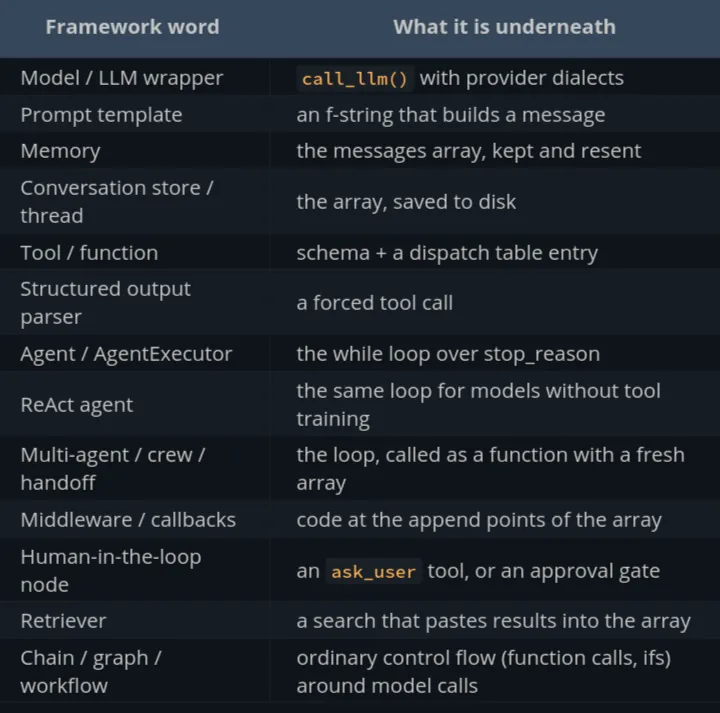
Every Framework Is a Wrapper
- The framework stands between you and the array.
- The frameworks did not shrink when the models grew; they pivoted to orchestration, observability, and enterprise integration.
- A LangGraph graph is a state machine whose nodes call models.
- A common failure goes like this: your agent misbehaves, the fix requires knowing exactly what was sent to the model, and you spend a day digging through abstraction layers to find the actual bytes on the wire. If the framework makes the outgoing request easy to see and shape, the price is small. If it hides the request as an implementation detail, it makes debugging and tuning the harness much harder.
Worth paying for:
- Provider abstraction when you genuinely serve multiple model vendors: someone maintains the dialect zoo so you don’t.
- The boring plumbing: retries, rate-limit backoff, streaming plumbing, usage accounting.
- Observability integrations: tracing UIs that show every request and response.
- Team legibility: a known framework is documentation.
Ask four questions:
- Where is the loop? Find the code that calls the model repeatedly on
tool_use. - Who builds the array? Can you see and modify the final request (messages, order, system prompt) before it is sent?
- What is its unit of composition? Chains (function composition), graphs (state machines) and agents-as-tools are all fine, and all of them are control flow.
- What does it do that is not in this series? Usually the honest answers are integrations, tracing, and deployment plumbing.
Extending the Body: MCP, Skills, Deferred Loading, Hooks
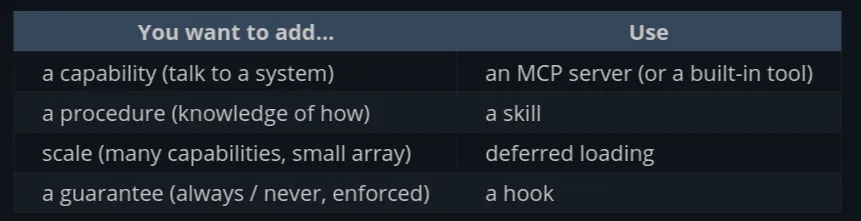
The failure: our harness’s capabilities are hardcoded. Every tool is a function in our source; every behavior is a line we wrote. How capabilities get into the body, and into the array, without the harness author writing them and without drowning the budget? MCP (someone else’s tools), skills (someone else’s instructions), deferred loading (tools that stay out of the array until needed), and hooks (someone else’s reflexes).
MCP: tools from other processes
- An MCP server is a small external process (or remote service) that speaks a JSON-RPC protocol. The harness, as MCP client, launches or connects to it and asks
tools/list. The server replies with tool definitions: name, description, JSON schema.
- MCP servers also offer resources (readable data, like files) and prompts (reusable templates); tools carry most of the real traffic.
- An MCP server is code you are wiring into your agent’s body, with all the trust questions of any dependency, plus new ones: its tool descriptions go into your array (a channel for injected instructions) and its results come back as “world truth.”
Skills: instructions on demand
- MCP delivers capabilities, but much of what makes an agent useful in a particular team is knowledge of procedure: how we write commit messages, how to run the release, how this odd test harness works.
- A skill is the budget-respecting version: a folder with a markdown file of instructions (plus optional scripts and templates), with a name and a one-line description. At session start, the harness injects only the names and descriptions: a menu, a few hundred tokens for dozens of skills.
- The mechanism deserves a name because you will use it constantly: progressive disclosure. You keep the index in context and pull the detail on demand.
- A skill can even bundle executable scripts, which the model runs with its ordinary shell tool. The skill teaches when and how, and existing tools do the work, so instructions compose with capabilities.
Deferred loading: the tool list on a diet
- The skills menu → The array carries a compact list of deferred tool names plus one real tool:
tool_search. When the model needs, say, spreadsheet capabilities, it searches; the harness returns the matching schemas and, on providers that support it, activates them for subsequent requests.
- A hundred connected tools ride as a hundred short lines plus one searcher, instead of a hundred full JSON schemas.
- MCP, skills, and deferred loading all use the same pattern at three levels (tools, instructions, and schemas): keep a short index in the array, keep the detail outside it, and fetch the detail only when needed.
Hooks: deterministic reflexes
- A hook is a user-supplied script bound to a lifecycle event of the loop. The harness defines the events (before a tool call, after a tool call, when the user submits a prompt, when the turn ends, when the session starts, and so on).
- Its exit code and output can do one of three things: observe (log it), augment (add a message, injected), or veto (block the tool call and tell the model why).
- Hooks are how users install guarantees: guardrails, policy, hygiene, integration.
Debugging the Array
The debugging rule for harness work is one sentence: You cannot fix the prompt you cannot see. So look at the actual request, first, always.
- Capture at the last possible point before the HTTP call. If any layer can modify the request after your logging (an SDK adding headers and defaults, a middleware reordering tools), your capture is wrong. A whole class of bugs comes from the gap between “what my code assembled” and “what left the machine.”
- If the model misread a file, find the
tool_result, and you’ll see your truncation cut the file at exactly the wrong line.
- Again, production harnesses watch
cache_read_input_tokenscontinuously.
Mocking requests from the harness:
- Presence: memory injected on the first message; the reminder drained into the next request; the deferred tool activated after search.
- Placement: system prompt is exactly [prompt, then tool schemas, in sorted order]; reminders land at the bottom, never the top.
- Bytes: for prefix-critical regions, assert on the exact string. The same request twice must produce byte-identical prefixes; a session’s turn-2 prefix must extend turn-1’s.
Extra plumbing:
- Subagents: the parent sees only the report, by design, so when a child returns a wrong answer, capture is your only window into its thirty rounds. Persist every child’s transcript (they are just arrays; sessions are files) keyed by the spawning tool call, and make them inspectable. From there, you find the round where the child went wrong, and the cause is usually one of the same three: never in its array (a bad task briefing from the parent, most common), mangled in its array, or model failure.
- The event side: reminders and wakeups originate outside any request, so log the queue too: what was enqueued, by whom, when it drained. The question “why did the model think a file changed?” is answered in the queue log; the array only shows the sentence that arrived.
Reflexes and Guardrails
The model never executes anything; it requests. Production harnesses define narrow tools when they can.
Layer 1: Deterministic Reflexes
Plain code that inspects each tool request before it runs:
- protected paths
- allowlists and denylists
- state-machine guards (records which files the model has read and when, an edit to a file the model never read, and what changed on disk since the last time the model saw it)
- checks against obvious mistakes (block foreground sleep, git push force, etc.)
Layer 2: Asking the Human
Production harnesses manage fatigue with:
- Permission modes
- Remembered grants
- Scoped autonomy: approve a plan, then let the loop run the steps unattended
Layer 3: a cheap brain judging the big brain
Using a model to check the model:
- The classifier is also a language model: it hallucinates and it can be prompt-injected by the very text it is judging (treat its verdict as evidence, not authority)
- Bias it one way: when the errors are asymmetric, the thresholds should be too
- Never let it be the only layer
Layer 4: blast radius
Assuming one gets through and shrinks what it can destroy:
- Recoverability
- Sandboxes and OS-level enforcement
- Credentials
RAG Was a Harness Pattern All Along
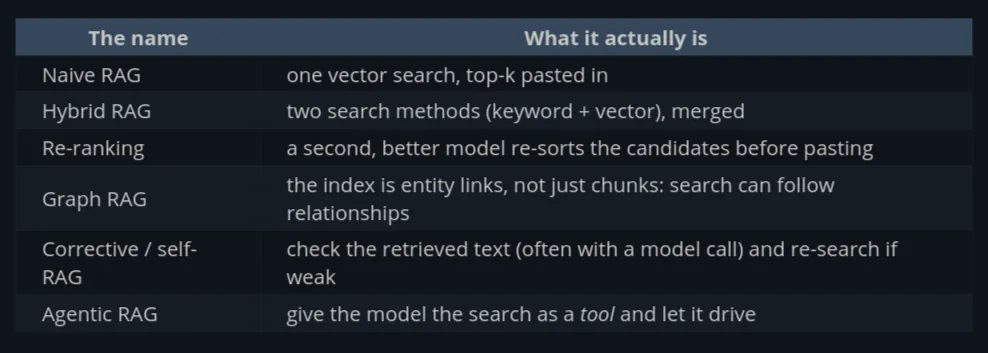
Around 2023 the standard answer to this got a name, an ecosystem, and a scary-looking body of research: RAG, Retrieval-Augmented Generation. Vector databases, embeddings, chunking strategies, and then the long list of types: naive RAG, advanced RAG, hybrid RAG, graph RAG, corrective RAG, self-RAG, re-ranking pipelines.
RAG is deciding what goes in the array, with a search index doing the choosing. Every variant is a different answer to “which text, chosen how.”
def rag_answer(question):
    chunks = search(question, top_k=5)          # the harness decides
    context = "\n\n".join(c.text for c in chunks)
    messages = [{"role": "user", "content":
        f"Answer using this context:\n{context}\n\nQuestion: {question}"}]
    return call_llm(messages)
The famous machinery all lives inside that search() call:
- Embeddings: turn text into vectors such that similar meanings land near each other, so “how do I get my money back” finds the refunds policy despite sharing no words.
- Chunking: split documents into retrievable pieces.
- Vector database: store the vectors, find nearest neighbors fast.
- This is all real engineering, but it’s search-index engineering: none of it touches the model or the loop. Embedding search is one search method among several, better than keyword search at synonyms and fuzz, worse at exact identifiers and rare tokens (which is why production search is usually hybrid: run both, merge).
Push vs pull: the real dividing line
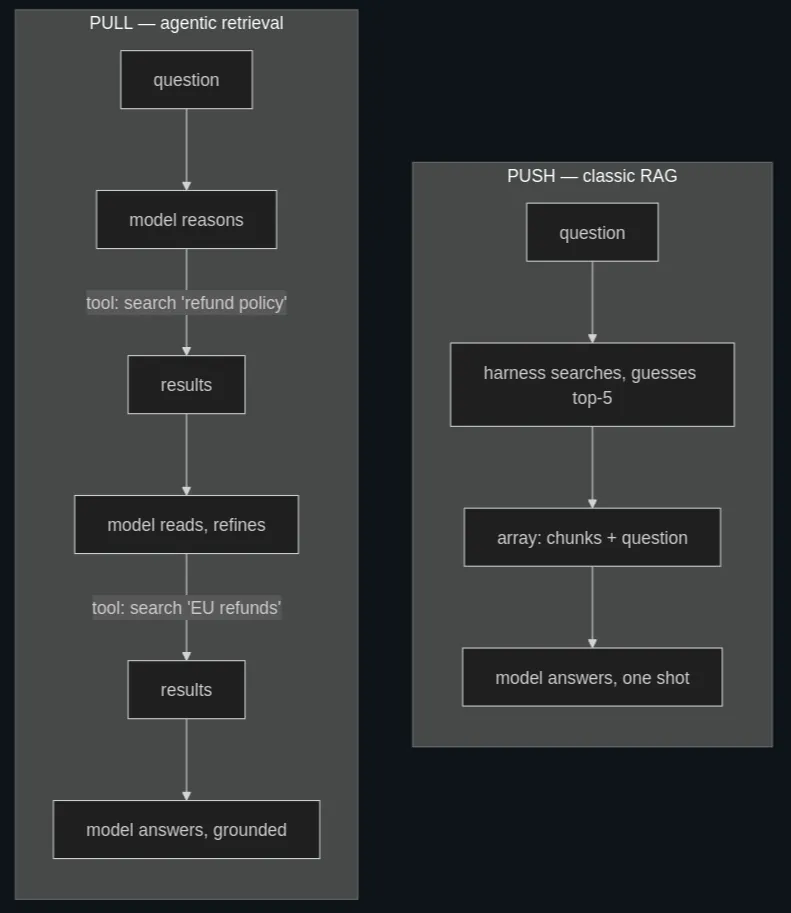
- Push means the harness guesses up front. Pull means the model searches while it reasons. Most systems need both.
- Pull wins on quality → the push harness must guess relevance from the question alone, in one shot, before any reasoning happens, and if it guesses wrong, the model answers confidently from the wrong pages. The pull model formulates its own queries mid-reasoning, sees the results, notices they are off, and searches again, so the retrieval has a feedback loop in it.
- Push wins on cost and latency → it takes one search and one model call. A pull loop is several rounds of an expensive brain. For a high-volume support chatbot answering single-hop questions over a clean document set, classic push RAG remains the correct engineering answer, and “agentic” would be waste. Push is also the only option when there is no loop at all: batch pipelines, one-shot API products, strict latency budgets.
- A fine pattern is a cheap push (paste an obviously relevant page) plus pull tools for everything else. A coding agent already works this way: the memory file is push and grep is pull.
Building your own body
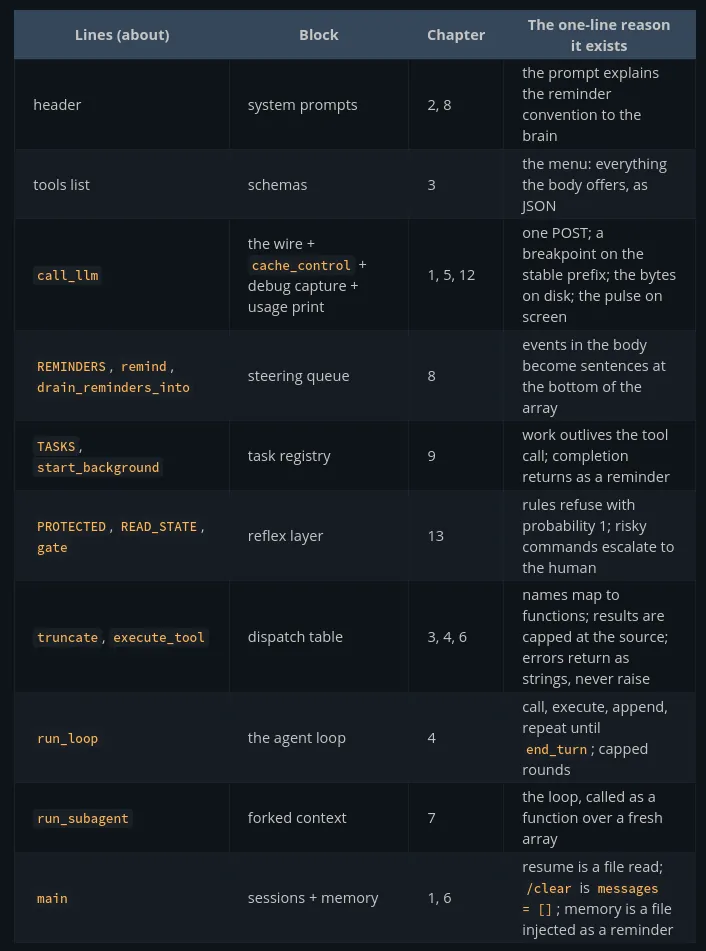
The skeleton is an array, a loop, a dispatch table, a queue, and a gate.
Plus these features:
- Watch the money
- Compaction
- Replay
- A second dialect
- Parallel subagents
- A real sandbox
One Harness, Many Brains
A production harness makes dozens of kinds of model calls per session. Model routing is the fix: the harness assigns each job the cheapest brain that does it reliably.
- Route by consequence, not by difficulty alone. A compaction summary that is 10% worse loses a little context.
- A delegated task worth doing is worth a capable model. The tempting mistake is routing subagent work to the cheapest tier because it is “background.” Then the search agent returns a confidently wrong answer, the main loop builds on it, and you spend frontier tokens debugging a haiku-sized mistake.
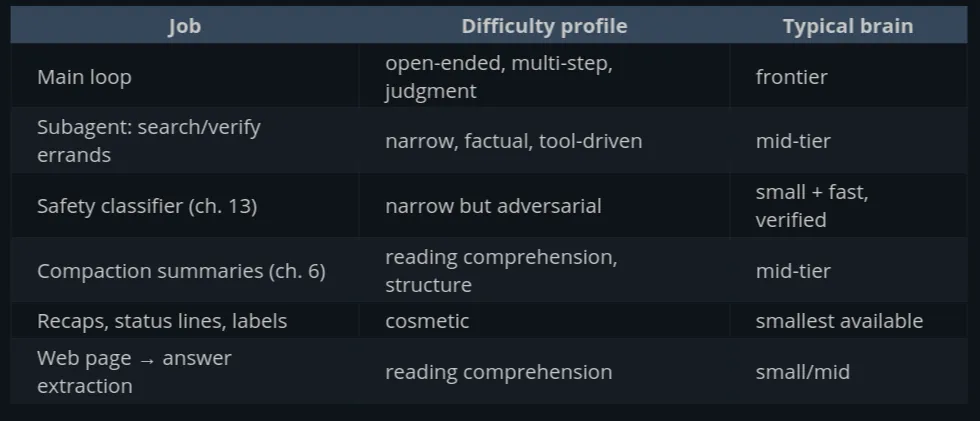
Prompt tiers: the body adapts to the brain
- Routing is only half of the work. The other half is that the same harness should not send the exact same array to different models.
- System prompt tiers. The frontier model gets the lean prompt; it does not need three paragraphs on how to use tools. The mid-tier prompt adds worked examples and firmer procedural scaffolding; the low-tier prompt is close to a checklist. The policies are the same; only the level of instruction changes.
- Tool set tiers. Frontier models are happy driving everything through a shell. Weaker models do measurably better with dedicated
grep/find/lstools whose schemas constrain them, so those tools activate only on lower tiers. Structure goes up as capability drops.
- Steering density. Reminders that a frontier model treats as noise are what a small model depends on. The reminder queue can carry tier-dependent traffic.
- The general rule is that capability and scaffolding trade off. As models improve, the harness needs less scaffolding, and a harness that supports several model tiers needs a different amount of scaffolding for each.
Part IV - 👻 Appendix
Worktrees and Isolation
Give each worker its own copy of the world, and merge deliberately.
- In a harness, when you spawn an agent whose task is “make changes” (rather than “look things up”), you create a worktree, point the child’s tools at that directory as their root, and record the branch. When the child reports done, the merge is its own deliberate step: show the human a diff, or run tests, then git merge / rebase, then remove the worktree. If the child failed or went wrong, removal is the whole cleanup: the main tree never saw a byte of the mess. An unchanged worktree can be deleted automatically, while a changed one can be kept for review.
- Untracked state:
node_modules, build caches,.envfiles.
- Global mutable state: databases, docker daemons, package caches, the network. Two agents “isolated” in worktrees can still fight over port 3000 or the same test database. Worktrees isolate the code and leave the runtime shared.
- A worktree inside a container is a sensible setup.
Retries, Rate Limits, and Streaming
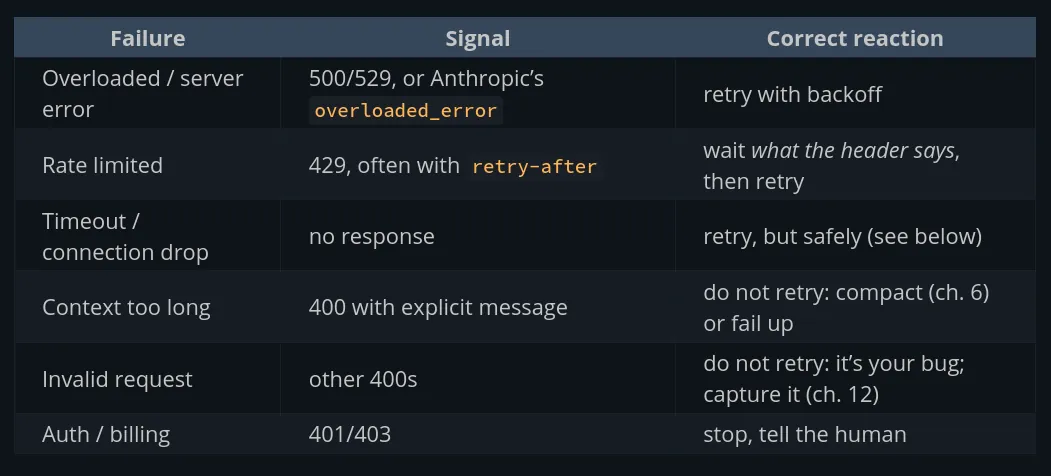
- Split between temporary and permanent failures. Retrying a 529 is correct; retrying a 400 is a loop that burns budget and buries the real error.
- Retries are only safe because the API is stateless.
- Rate limits are measured in tokens, so context size and fan-out, not request count, are what exhaust them.
- Set
"stream": trueand the provider keeps the HTTP connection open and sends server-sent events (SSE): a long series of smalldata: {...}lines instead of one JSON body. Each event is a fragment.
- The harness’s job is accumulation: append each delta to the block it belongs to, and when the stream ends, you hold exactly the assistant message a non-streaming call would have returned.
- Streaming stops being optional as requests grow. The engineering reason to stream even a headless call is that first-token latency becomes your health signal.