🧠 IDEA → Secure Research Pipelines in the Agentic Era
This article launches a series of conversational notes on building secure, AI-native research workflows across various operating systems — starting with macOS — by integrating data extraction and automation tools while avoiding unsafe plugins and related threat vectors.
🌟 EDIT: this project started one day after this post and it implements the ideas discussed here. I love seeing this conversation!
🌟 EDIT 2: This is uber-cool too (by the masters, Guido's team); and also the one from NVIDIA (awesome blog post). We all know that Rust is the most serious language for this type of work.
🌟 EDIT 3: It turns out that this work is directly relevant to the work we're doing on NULLSTAR's PleiadesOS:CELAENO module.
🦖 TL;DR
As AI agents become increasingly integrated into research workflows, the risk profile of executing unvetted code or third-party plugins grows. To mitigate these risks, researchers require an isolated, reproducible environment that does not compromise the host operating system.
This guide details the implementation of a high-performance, secure stack on macOS — leveraging Lima, Podman, Distrobox, and Lazydocker — to create a seamless bridge between BSD-based macOS and the Linux-native features required for modern AI research agents.
🦖 Architecture Overview
Because macOS is built on the Darwin kernel (a BSD derivative), it speaks a different 'internal language' than Linux. It lacks the native namespaces required to allow a process to operate as if it were in its own isolated environment (i.e., process isolation, hiding other processes and files from the container), as well as Control Groups (cgroups), which act as the resource 'meter' to prevent a container from hijacking system memory or CPU (i.e., resource hardening by capping RAM, CPU, and I/O usage).
To bridge this gap, we use Lima. It spins up a lightweight Linux kernel inside macOS, providing the native environment these features need to function securely:
| Layer | Technology | Function |
|---|---|---|
| Virtualization | Lima | A Linux subsystem for macOS that utilizes the Apple Virtualization Framework (or QEMU) to provide a low-overhead Linux kernel. |
| Engine | Podman | A daemonless, rootless container engine that implements the OCI specification without the security vulnerabilities of a root-privileged Docker daemon. |
| Compatibility | Distrobox | A high-level wrapper that maps host users, home directories, and X11/Wayland sockets into containers. |
| Orchestration | Lazydocker | A Terminal User Interface (TUI) providing real-time telemetry and container management. |
💡 As of 2026, Docker remains the industry heavyweight for local development, while Podman has become the standard for security-sensitive and Kubernetes-native workflows. The primary difference is architecture: Docker relies on a central background service (a daemon), while Podman is daemonless (fork/exec), meaning it runs containers as independent processes. Additionally, Podman integrates beautifully with
systemd, allowing you to manage containers as if they were standard system services.
0️⃣ Setting the Environment
The host system requires the Homebrew package manager for dependency resolution and iTerm2 and tmux for advanced terminal multiplexing.
But before deploying this stack, ensure your system is running macOS Ventura (13.0) or later to take full advantage of the Apple Virtualization Framework (vz).
Additionally, ensure Xcode Command Line Tools are installed (xcode-select --install), to provide the underlying compilation tools required by Homebrew and Lima for high-performance I/O bridging.
/bin/bash -c "$(curl -fsSL https://raw.githubusercontent.com/Homebrew/install/HEAD/install.sh)"
brew install iterm2
brew install tmux
💡 You should customize your
.tmux.conf. Mine is here (or, if you are feeling inspired, set your iTerm2's profile).
1️⃣ Deploying the Linux Subsystem (Lima)
Lima (Linux Machine) facilitates the execution of Linux binaries on macOS with automatic file sharing and port forwarding:
brew install lima
If you would like to have more choices for distro images, you can install:
brew install lima-additional-guestagents
Apple Silicon Optimization
For ARM-based macOS architecture, performance is maximized by using the native Apple Virtualization Framework (vz) and virtiofs for high-speed file I/O.
Here is a quick command that starts a Lima VM (name your podman the way you like):
limactl start --name=podman template://fedora --set '.vmType="vz" | .rosetta.enabled=true | .rosetta.binfmt=true | .mountType="virtiofs"'
Lima orchestrates an automation sequence that begins by downloading a specialized base image (a lightweight Linux distribution; in this case, Fedora) and configuring the virtual hardware with optimized CPU, RAM, and disk settings.
It then proceeds to handle the heavy lifting by installing Podman and its necessary dependencies, mounting the macOS home directory into the VM, and exposing the Podman socket to create a direct communication bridge.
You can check whether podman is running (and its stats) with:
limactl list

NAME      STATUS     SSH                CPUS    MEMORY    DISK      DIR
podman    Running    127.0.0.1:50334    4       4GiB      100GiB    ~/.lima/podman
Once the VM starts, drop into the shell to install Podman inside the VM:
limactl shell podman sudo dnf install -y podman
Ensure the Podman socket is active (so the local machine can talk to the guest VM):
limactl shell podman sudo systemctl enable --now podman.socket
By the way, you can check all the available distros with:
limactl start --list-templates
In a slightly different setup, you can define a reproducible config file for Lima, through lima-podman.yaml.
To ensure your environment can handle local LLM inference or large-scale data parsing, you can explicitly define resource allocation, such as a configuration of cpus and memory (helping to set a baseline to prevent bottlenecks during intensive Python-based extraction tasks):
arch: "x86_64"

images:
  - location: "https://download.fedoraproject.org/pub/fedora/linux/releases/40/Cloud/x86_64/images/Fedora-Cloud-Base-Generic-40-1.14.x86_64.qcow2"
    arch: "x86_64"
  - location: "https://cloud-images.ubuntu.com/releases/24.04/release/ubuntu-24.04-server-cloudimg-amd64.img"
    arch: "x86_64"

cpus: 4
memory: "8GiB"

vmOpts:
  vz:
    rosetta:
      enabled: true
      binfmt: true

provision:
  - mode: system
    script: |
      # Check for dnf (Fedora) or apt (Ubuntu) to make the script universal
      if command -v dnf > /dev/null; then
        dnf install -y podman
      elif command -v apt-get > /dev/null; then
        apt-get update
        apt-get install -y podman
      fi
You can start Podman using this command instead (name your podman the way you like):
limactl start --name=podman ~/lima-podman.yaml
2️⃣ Implementing Distrobox for OS Interoperability
Once the Lima VM is active, we utilize Distrobox.
Unlike standard containers, Distrobox containers are designed to be used as interactive development environments. They share the host's $HOME directory, allowing AI agents to process local datasets while remaining confined to a specific Linux distribution:
Enter the VM environment:
limactl shell podman
Install Distrobox within the VM:
curl -s https://raw.githubusercontent.com/89luca89/distrobox/main/install | sh -s -- --prefix ~/.local
Declarative Environment Setup
Define research environments in a distrobox.ini config file to ensure reproducibility across different machines:
sudo dnf install -y vim
mkdir -p ~/.config/distrobox
vim ~/.config/distrobox/distrobox.ini
Here is an example (you can rename your environments the way you like, and add the distros you prefer):
[ubuntu-research]
image=ubuntu:22.04
additional_packages="python3-pip git vim"
init=true

[arch-research]
image=docker.io/lopsided/archlinux
init=true
To provision all environments simultaneously, execute:
distrobox assemble create --file ~/.config/distrobox/distrobox.ini
You can check the Distrobox status with:
distrobox list

ID           | NAME                 | STATUS             | IMAGE
feb37957c1db | ubuntu-research      | Created            | docker.io/library/ubuntu:22.04
a56c0536acb2 | research-arch        | Created            | docker.io/lopsided/archlinux:latest
Running Linux Binaries as Native macOS Commands
The superpower of Distrobox is its ability to bridge the gap between isolated Linux containers and the host shell through a feature called distrobox-export.
This command generates a small wrapper script on the host system and, when running with Lima, it creates a clean development environment.
For instance, instead of installing heavy compilers directly in the host macOS, you can keep them in the Distrobox (and export them to VS Code with distrobox-export):
sudo dnf install python3.9 -y
distrobox enter --verbose ubuntu-research
distrobox-export --bin /usr/bin/python3.9 --export-path ~/.local/bin
exit
In the VS Code terminal on Mac, if you type python3 --version, the IDE will use the binaries inside the container, as if they were natively installed.
Debugging the Containers
You can check what's happening inside a container (in this case, arch-research) with:
podman logs arch-research
And, in some cases, you can exec into it (bypassing distrobox) with:
podman exec -it arch-research /bin/bash
3️⃣ Monitoring via Lazydocker TUI
To manage the lifecycle of these research environments without the overhead of complex CLI strings, we employ Lazydocker.
By mapping the Podman socket, Lazydocker provides a centralized dashboard for logs and resource consumption.
You can install it with the following commands (inside the Lima VM):
curl https://raw.githubusercontent.com/jesseduffield/lazydocker/master/scripts/install_update_linux.sh | bash
export DOCKER_HOST=unix://$XDG_RUNTIME_DIR/podman/podman.sock
lazydocker
4️⃣ Final Integration & Host Aliasing
To make this stack indistinguishable from native macOS tools, you can map the guest commands to the host shell (.zshrc). Here is an example of setup:
# UI Management
alias dbx-ui="limactl shell podman -- bash -c 'export DOCKER_HOST=unix://\$XDG_RUNTIME_DIR/podman/podman.sock && lazydocker'"

# Direct Container Access
alias ubuntu="limactl shell podman -- distrobox enter research-ubuntu"
alias arch="limactl shell podman -- distrobox enter research-arch"

# Automation: Ensure the VM is active upon terminal launch
if ! limactl list | grep -q "podman.*Running"; then
  limactl start podman
fi
Additionally, ensure that your .zshrc aliases include the $XDG_RUNTIME_DIR export; to ensure that Lazydocker can instantly communicate with the Podman socket the moment you launch your TUI dashboard, providing immediate telemetry on your research agents.
🦖 Cleaning Up
Whenever a research project is complete, you can clean the disk space (Lima VMs can grow to tens of gigabytes) with:
- Delete the Lima Instance:
limactl stop podman
limactl delete podman
- Remove local config files:
rm -rf ~/.lima/podman
🦖 Security Considerations
Rootless Podman
Unlike Docker, Podman does not require a root-privileged daemon, significantly reducing the attack surface if an AI agent executes malicious code.
Data Persistence
While the containers are ephemeral, the data stored in ~/ persists on the macOS host, allowing for stateless computation with stateful storage.
Prompt Injection and Indirect Code Execution
While traditional containers protect against known vulnerabilities, AI-native workflows introduce the risk of 'hallucinated' or injected malicious commands. By isolating the agent in a rootless Podman environment, even a successful Remote Code Execution (RCE) attempt is contained within a non-privileged namespace, preventing the agent from accessing your macOS Keychain, browser cookies, or the host's /Users directory.
💡 For instance, Obsidian plugins operate with broad access to the local environment, which introduces a meaningful security risk if not carefully managed. Because plugins can read and write files within the vault — and in some cases interact with external services — they may expose sensitive notes, metadata, or system information if malicious or poorly maintained. The threat model includes risks such as data exfiltration, supply chain attacks through compromised plugin updates, and unintended vulnerabilities introduced by third-party code.
🦖 Performance Tuning
- Memory Allocation: If running LLM-heavy workloads (e.g., local Ollama instances within a container), increase the VM memory in
~/.lima/podman/lima.yaml.
- I/O Performance: The
virtiofsmount type is critical for research tasks involving large datasets (e.g., CSV/JSON extraction).
🦖 Outro
By abstracting the Linux kernel through Lima and Podman, researchers can leverage the vast ecosystem of Linux-native tools and AI agents without compromising the integrity of their primary macOS environment. By the way, if you are a UI person, you can also install podman-tui or podman desktop.
Looking ahead, we would like to systematize this setup using podman-compose, and even Kubernetes or other OpenContainer orchestration tools. Then, transitioning from infrastructure, we would like to explore the application in current moats, such as by deploying and configuring Obsidian and AutoResearch with local or enterprise models to create a private research hub, and exploring the full capabilities of qmd.
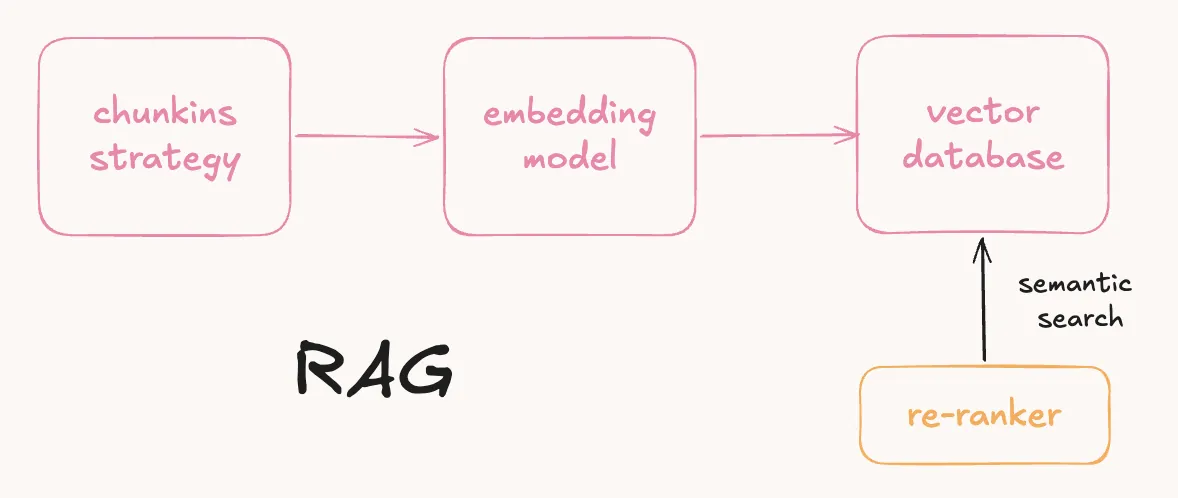
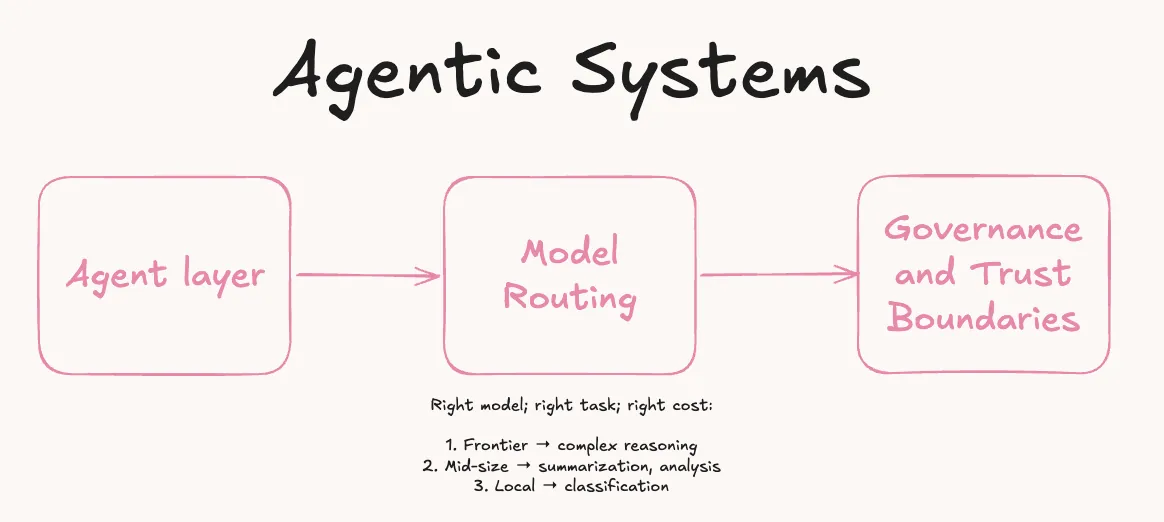
Future explorations may include automated data extraction agents for streamlined information gathering, version control strategies, considering the trade-offs between using MCP servers (which offer standardized extensibility at the cost of higher setup complexity), the Obsidian Copilot plugin (which provides a "plug-and-play" experience but may lack the deep system integration and granular control of a dedicated MCP-based architecture), and evaluating the leading autonomous agents for these tasks — comparing with all the many (actually RAG-y) strategies, frameworks, and tools (such as OpenRAG, RAG-Anything, LightRAG, LangChain, CrewAI, AutoGPT, and OpenSearch, etc.) to determine which provides the most reliable integration for specific research workflows and data processing needs.
Beyond that, the possibilities are vast: integrating multiple LLMs for private data processing, orchestrate multi-agent workflows, and building automated and advanced research pipelines — all within sandboxed ecosystems.